How to Program Your Garage Door Remote | ACA Garage Door Repair in Redwood City, CA
Is your garage door remote not working? Learn how to program it with our step-by-step guide from ACA Garage Door Repair in Redwood City, CA. Keep your home secure and convenient.
How to Program Your Garage Door Remote: A Comprehensive Guide
Programming your garage door remote may seem daunting, but it's simpler than you might think. A functional garage door remote enhances convenience and security, ensuring that your entrance is only a click away. If you're located in Redwood City, CA, and are looking for expert tips from ACA Garage Door Repair, you've come to the right place!
Understanding Your Garage Door Remote
Before diving into the programming process, it’s essential to familiarize yourself with your garage door remote. Here are a few key components:
- Buttons: Most remotes have a few buttons, often including open, close, and a light button.
- Battery Compartment: The battery needs to be functional for the remote to work at all.
- LED Indicator: This light informs you about the status of the remote, such as when it's functioning correctly or when the battery is low.
Why You Might Need to Reprogram Your Remote
Many factors could necessitate reprogramming your garage door remote:
- Battery Replacement: Changing the battery often resets the programming.
- New Garage Door Opener: If you've recently installed a new garage door system, you will need to sync your remote.
- Security Reasons: If your remote was lost or stolen, reprogramming is crucial to maintain security.
Step-by-Step Guide to Programming Your Garage Door Remote
Follow these detailed steps to program your garage door remote:
Step 1: Gather Your Materials
Before start programming your remote, ensure you have:
- Your garage door remote
- The garage door opener unit
- A ladder (if necessary)
- New batteries (if required)
Step 2: Locate the Learn Button
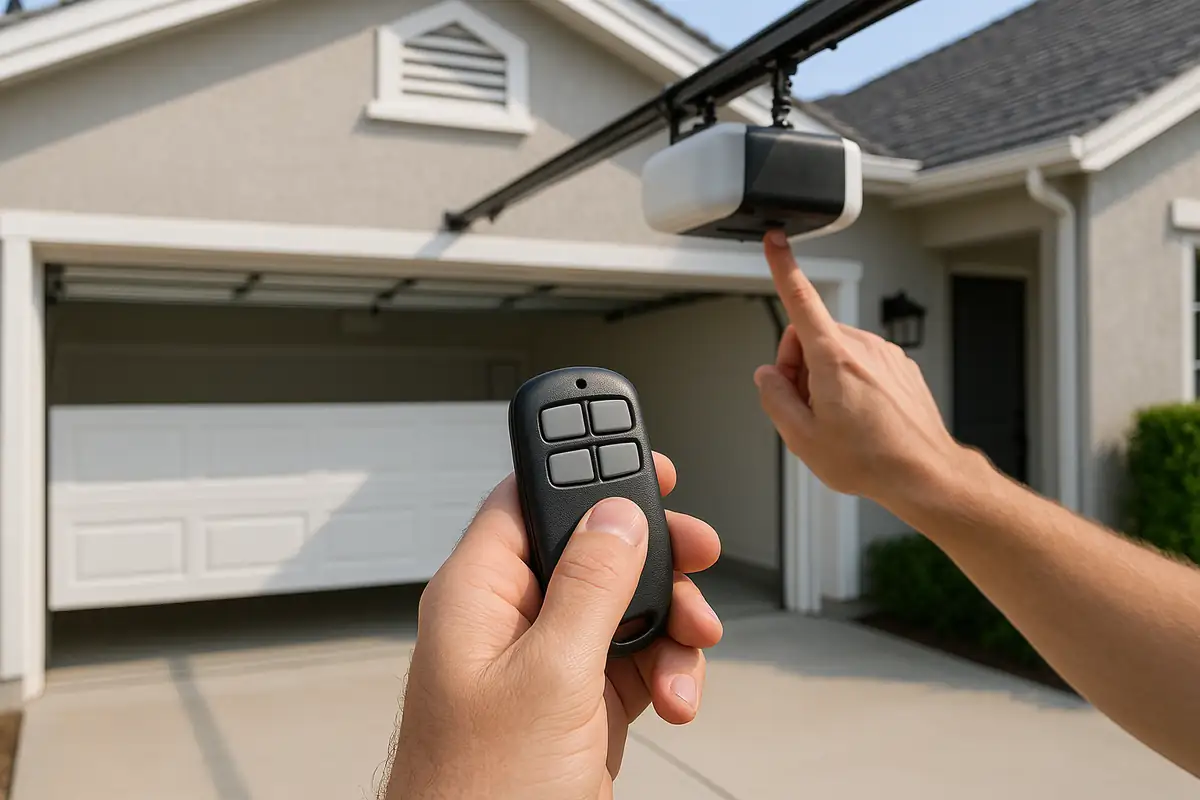
Open your garage door opener unit, usually mounted on the ceiling of your garage. Look for the Learn button, often near the antenna wire. It might be colored red, yellow, or purple, depending on the manufacturer.
Step 3: Clear Existing Codes (if needed)
If you're reprogramming or want to clear old remotes, press and hold the Learn button until the light turns off (usually around 6 seconds). This clears all programmed remotes.
Step 4: Program Your Remote
- Press the Learn button. A light will turn on, indicating that the opener is ready to accept a new signal.
- Within 30 seconds, press and hold the button on your remote that you wish to program. The light on the opener will blink, indicating successful programming.
- Release the button once the light stops blinking.
Step 5: Test the Remote
After programming, test the remote by pressing the button to open and close the garage door. If it operates smoothly, congratulations! Your remote is now programmed.
Common Issues and Troubleshooting Tips
Even with careful programming, you may encounter some hiccups. Here are some common issues and troubleshooting tips:
- Remote Not Working: Check the battery first. If that’s fine, try reprogramming.
- Interference Issues: Sometimes, other electronic devices can interfere. Ensure there are no nearby devices that could disrupt the signal.
- Repeated Programming Needed: If you frequently need to reprogram, it may indicate a deeper issue. Contact a professional.
When to Call ACA Garage Door Repair
If you continue to experience issues with your garage door remote or opener, it might be time to consult a professional. ACA Garage Door Repair in Redwood City, CA, has experienced technicians who can diagnose and solve complex problems efficiently.
Maintaining Your Garage Door Opener
Regular maintenance can extend the life of both your garage door opener and remote. Here are some quick maintenance tips:
- Check the batteries in your remote every few months.
- Inspect the garage door opener and ensure it's clean and free of debris.
- Test your garage door's auto-reverse feature to ensure it's functioning safely.
Conclusion and Call to Action
Programming your garage door remote doesn't have to be a complicated task. By following these steps, you can quickly regain control of your garage door. If you encounter persistent problems or seek professional assistance, ACA Garage Door Repair in Redwood City, CA, is here to help. With our experienced team, we ensure the safety and convenience of your home for you and your family. Don’t hesitate to reach out for more guidance or to schedule a service today!
Explore More Resources
Related Articles
Service Areas
We proudly serve Redwood City, Redwood Junction, North Fair Oaks, San Carlos, Lindenwood and more areas.
Our Services
Professional garage door repair, spring repair, opener installation and more. View all services →